

As a food blogger, adding recipes that are easy to read, share, and find in search results changes how readers interact with your content. Recipe plugins give you structured recipe cards, SEO-friendly markup, and reader-focused features like scaling, unit conversion, and guided cooking modes.
You save time when publishing, improve discoverability in search engines, and make it simpler for readers to follow your recipes — which can lead to more page views, social shares, and returning visitors.
Top Picks
| Category | Product | Price | Score |
|---|---|---|---|
| 🏆 Best Overall | Tasty Recipes | Starting at $49 | 96 |
| 🎨 Best for Customization | WP Recipe Maker | $49 | 90 |
| 🚀 Best for AI Recipes | Recipe Card Blocks | Starting at $49 | 88 |
How We Chose the Best Recipe Plugins
You want plugins that make your recipes discoverable, simple to follow, and fast to publish. We prioritized:
– SEO & structured data: Does the plugin produce valid recipe schema and help your recipes appear in rich results?
– Reader experience: Features like cook mode, printable cards, ingredient scaling, and unit conversion that make recipes easier to use. – Customization & design: Ability to match the card to your blog’s design and tweak layout, fonts, and metadata. – Workflow & integrations: How the plugin fits with the WordPress editor, blocks, page builders, and other plugins you use.
– Advanced features: AI recipe generation, guided recipe flows, timers, and nutrition fields where relevant. – Performance & compatibility: Impact on load times and compatibility with themes and caching.
– Price & licensing: Value for solo bloggers versus agencies or multi-site setups. – Support & updates: Active development and reliable documentation you can lean on.
You can use these criteria to pick a plugin that matches your priorities — whether you need the most polished UX for readers, deep customization, or automation to speed up publishing.
Tasty Recipes makes adding beautiful, usable recipe cards to your WordPress site simple. You can drop in a card that looks great, is indexed well by search engines, and gives readers features they actually use — scaling for different serving sizes, unit conversion, and a distraction-free cook mode.
For day-to-day posts it’s fast to set up: paste or type your recipe, tweak the layout and metadata, and you’re ready. For special-occasion or multi-step guides, the guided recipes and printable options keep readers on track.
If you want a plugin that balances design, SEO, and reader-friendly tools without a steep learning curve, this is a solid pick.
What People Say
Feedback tends to praise the practical features — especially scaling, cook mode, and the clean recipe display. Users say it improves reader experience and makes recipes easier to follow, with many noting quicker setup than more complex recipe plugins.
Overall Sentiment: Positive

🗣️ TastyBlogger
The recipe scaling and unit conversion are lifesavers — readers can switch servings and get ingredient amounts instantly. Cook Mode keeps readers on the page while they cook and the cards look professional without me fiddling with CSS.
🗣️ HomeCookAnna
Setup was straightforward and the SEO fields helped my recipe posts start ranking. I use guided recipes for multi-step dishes and the printable layout has gotten great feedback from readers.
| Pros | Cons |
|---|---|
| ✅ Easy-to-read, attractive recipe cards | ❌ Some advanced layout tweaks may require CSS |
| ✅ Useful reader-facing tools like scaling and cook mode | ❌ Premium features are behind a paid plan |
| ✅ Good SEO support with structured data | |
| ✅ Lightweight and integrates with most themes |
Ease of Use
| Feature | Ease Level |
|---|---|
| Setup | Easy |
| Recipe Card Editing | Easy |
| Scaling & Unit Conversion | Easy |
| Cook Mode | Moderate |
Usability
| Aspect | Ease Level | Notes |
|---|---|---|
| Theme Compatibility | Easy | Plays well with most themes; minimal styling conflicts out of the box. |
| Mobile Experience | Easy | Responsive recipe cards and cook mode work smoothly on phones and tablets. |
| SEO Configuration | Moderate | Structured data is handled automatically, but you can add custom metadata if needed. |
| Support & Documentation | Easy | Clear docs and support resources for getting started and troubleshooting. |
Key Benefits
- SEO-friendly recipe markup that helps search visibility
- Recipe scaling and unit conversion for flexible servings
- Distraction-free Cook Mode for real-time cooking
- Guided recipes and printable layouts for complex dishes
Current Price: $49.00
Rating: 5.0

If you want clean, searchable recipe cards without wrestling with code, WP Recipe Maker is built for you. You can drop in attractive, structured recipe cards that help search engines understand your content and give readers useful tools at a glance. For everyday posts — think quick weeknight dinners or breakfast ideas — it speeds up publishing: paste your recipe, tweak the layout, and you’re done. For special occasions like holiday menus or multi-step projects, the card options, printable views, and clear ingredient/instruction blocks keep readers on track.
It’s approachable even if you’re not technical, and a solid choice if you care about both aesthetics and SEO.
What People Say
Customers often highlight how quick it is to create clean, readable recipe cards and how the built-in structured data seems to help search performance. People also mention the ease of matching cards to their site design and appreciate features that improve reader experience, like printable layouts.
Overall Sentiment: Positive

🗣️ FoodieJen
Setup was straightforward and the recipe cards look professional right away. I noticed better indexing for my recipes after adding the structured data fields, and readers like the printable view for longer guides.
🗣️ BlogChefMike
The editor is intuitive — I can add ingredients, steps, and extra notes quickly. Customizing the card to match my theme took a few clicks, and the SEO-friendly markup has helped my posts show up in recipe search results.
| Pros | Cons |
|---|---|
| ✅ Attractive, SEO-ready recipe cards out of the box | ❌ Some deeper styling tweaks may still need custom CSS |
| ✅ Straightforward editor that speeds up posting | ❌ Advanced features are part of the paid plan |
| ✅ Good customization to fit different themes | |
| ✅ Printable options for reader convenience |
Ease of Use
| Feature | Ease Level |
|---|---|
| Setup | Easy |
| Recipe Card Editing | Easy |
| Customization | Moderate |
| Printable View | Easy |
Usability
| Aspect | Ease Level | Notes |
|---|---|---|
| Theme Compatibility | Easy | Plays nicely with most themes; minor styling changes may be needed for unique designs. |
| Mobile Experience | Easy | Recipe cards are responsive and readable on phones and tablets. |
| SEO Configuration | Moderate | Structured data is generated automatically, with options to add or tweak metadata. |
| Support & Documentation | Easy | Clear documentation and resources for setup and common tweaks. |
Key Benefits
- SEO-friendly recipe markup that helps search visibility
- User-friendly editor for fast recipe publishing
- Customizable card layouts to match your blog
- Printable recipe views for readers
Current Price: $49.00
Rating: 4.8

If you want recipe cards that look great and help search engines find your content, Recipe Card Blocks is built with that in mind. You can drop in a complete card that handles ingredients, steps, timers and nutrition without messing with code. For everyday posts — like weeknight dinners or batch-cooking notes — the AI Recipe Generator and unit conversion save you time and keep measurements consistent.
For holidays or multi-step projects, the printable views, timers and clear instruction blocks help readers follow along. It’s approachable: you’ll be able to add structured data that improves discoverability and tweak the card style so it fits your blog’s look.
If boosting engagement and SEO is part of your plan, this is a solid tool to try.
What People Say
People frequently mention how much time the AI features save and how the structured data improves recipe discoverability. Blog owners also appreciate the practical tools like unit conversion and printable views that make posts more reader-friendly.
Overall Sentiment: Positive

🗣️ SamTheBaker
The AI Recipe Generator cut my prep time in half — I paste in a rough idea and it produces a clear ingredient list and step-by-step instructions I can edit. Unit conversion has saved me from endless manual checks when I get international comments.
🗣️ MayaWrites
Structured data was the biggest win: after adding the cards my recipes started appearing more consistently in rich results. Customizable templates let me match the card to my theme without heavy CSS tweaks.
| Pros | Cons |
|---|---|
| ✅ Generates SEO-friendly recipe markup automatically | ❌ Some advanced styling still benefits from minor CSS tweaks |
| ✅ AI-assisted recipe drafting speeds up publishing | ❌ Top features may require a paid plan for full access |
| ✅ Useful practical tools (unit conversion, timers, printable views) | ❌ AI suggestions need occasional human editing for voice and accuracy |
| ✅ Styling options let you match the card to your site |
Ease of Use
| Feature | Ease Level |
|---|---|
| Setup | Easy |
| Recipe Creation | Easy |
| AI Recipe Generator | Moderate |
| Customization | Moderate |
Usability
| Aspect | Ease Level | Notes |
|---|---|---|
| Theme Compatibility | Easy | Works well with most themes; you may need small CSS tweaks for unique designs. |
| Mobile Experience | Easy | Cards are responsive and readable on phones and tablets. |
| SEO / Structured Data | Easy | Structured data is generated automatically, helping recipes appear in rich results. |
| Support & Documentation | Moderate | Documentation covers common tasks; direct support response times vary. |
Key Benefits
- Automatic structured data for better search visibility
- AI Recipe Generator to speed up recipe writing
- Unit conversion to handle metric and imperial seamlessly
- Customizable recipe card templates and printable views
Current Price: $49.00
Rating: 4.7
FAQ
Which Recipe Plugin Should You Choose In 2026?
You should pick the plugin that fits your workflow and audience rather than chasing features you won’t use. If you want a polished, all-around solution with a strong reputation, Tasty Recipes is a solid choice — it has a five star rating and starts at $49, offering recipe scaling, cook mode, unit conversion, and guided recipes that make it easy for readers to follow along.
If you prefer maximum flexibility and widespread developer support, WP Recipe Maker (commonly available at $49 for a core license) is user-friendly and highly customizable. If you want modern block-based editing and extras like an AI Recipe Generator, Recipe Card Blocks (starting at $49) gives you structured data and shareable cards. Consider which features you actually need, how comfortable you are with Gutenberg or legacy editors, and whether you need built-in conversion and guided cooking features before you decide.
Will A Recipe Plugin Really Improve Your SEO And Page Speed?
A recipe plugin can improve your visibility because it outputs structured data and recipe schema that search engines prefer, but it won’t magically replace good content, photos, or site performance practices. Use a plugin that generates clean schema (Tasty Recipes, WP Recipe Maker, and Recipe Card Blocks all focus on structured data) and then optimize images, lazy-load media, and combine the plugin with caching and a lightweight theme. For speed concerns, test the plugin on a staging site, disable unused modules, and check how many assets it loads.
If speed is critical, prioritize a plugin that offers efficient markup and the specific features you need so you avoid unnecessary bloat.
How Do You Use And Maintain Recipe Plugins Effectively?
You should install and test plugins on a staging site, back up your site before major changes, and keep plugins updated to avoid compatibility or security issues. Use features like unit conversion and recipe scaling to improve user experience, enable print-friendly output, and take advantage of guided recipe or cook modes to increase time-on-page.
If you switch plugins later, export your recipes and verify structured data in Google’s Rich Results test. For buying and support, weigh annual renewal costs against the value of time saved and support quality — many good options start at $49 — and confirm the plugin supports your recipe categories, nutrition data, and any multi-language needs. Regularly review your structured data in Search Console and monitor page speed after updates so you can keep your site both discoverable and fast.
Bloggers Top Picks
You typically choose between Tasty Recipes, WP Recipe Maker, and Recipe Card Blocks based on ease of use, how well the plugin handles recipe schema/SEO, and whether you want Gutenberg-native blocks or more advanced import/export and customization options. You also prioritize site performance and mobile responsiveness, print-friendly layouts, pricing and support, and how cleanly the plugin integrates with your theme and workflow.
Wrapping Up
If you want the most polished combination of SEO, reader features, and publishing speed, choose Tasty Recipes. If you prioritize deep styling options and a widely used, extensible solution, WP Recipe Maker is a solid pick.
If automation and modern features like an AI recipe generator and strong structured-data focus are what you need, Recipe Card Blocks deserves consideration. Match the plugin to your workflow and audience: improving how readers interact with your recipes will help you grow traffic, engagement, and repeat visits.
| Tasty Recipes WordPress Recipe Plugin | WP Recipe Maker | Recipe Card Blocks – WordPress Recipe Plugin | |
|---|---|---|---|
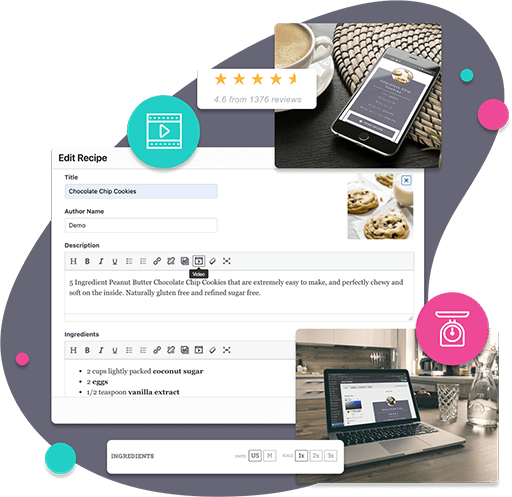 |
|||
| Rating | 5.0/5 (100+ reviews) | 4.8/5 (150+ reviews) | 4.5/5 (90+ reviews) |
| Key Highlights |
|
|
|
| Compatibility | WordPress; Compatible with most themes and page builders. | WordPress; Works well with existing themes and plugins. | WordPress; Integrates with Gutenberg blocks and classic editor. |
| Ease Of Use | User-friendly interface with easy setup; Minimal learning curve for beginners. | Intuitive interface; Easy for non-technical users to create and manage recipes. | Straightforward setup; Simple drag-and-drop functionality for blocks. |
| Price | Starting at $49 | $49 | Starting at $49 |
| Buy Now | Buy Now | Buy Now |
This Roundup is reader-supported. When you click through links we may earn a referral commission on qualifying purchases.